


“Original box pack” sounds straightforward. When you are buying an imported phone, though, it leaves a few questions unanswered. Is the box the one supplied with that handset? Has it been opened? Is the charger original? Has the phone already been activated?
This Realme Neo 8 original vs fake box guide gives you seven checks to make before paying. The aim is to understand the exact phone and accessories you are buying. Packaging can raise concerns, but its appearance alone cannot establish whether the handset is genuine or unused.
If you are comparing offers, check the latest Realme Neo 8 price in Pakistan, then compare the variant, box condition and included accessories alongside the price.
Why can Realme Neo 8 packing look different?
With imported stock, ask the seller to explain how the unit reached the shop. A box may have been opened for inspection or setup, damaged during handling, or replaced. These are possible explanations to investigate; they are not proof of what happened to the phone in front of you.
Get a clear description: factory sealed, opened with its original box, or supplied in replacement packaging. A genuine handset can come in a replacement box, and a convincing box can still contain a mismatched phone or charger. Chinese writing on a China-market product is not, by itself, a sign of a fake.
For an online order, ask for current photos of the actual unit. Stock pictures cannot show the condition of the box you will receive. Agree on any opening or testing with the seller first, especially if you want an unactivated unit.
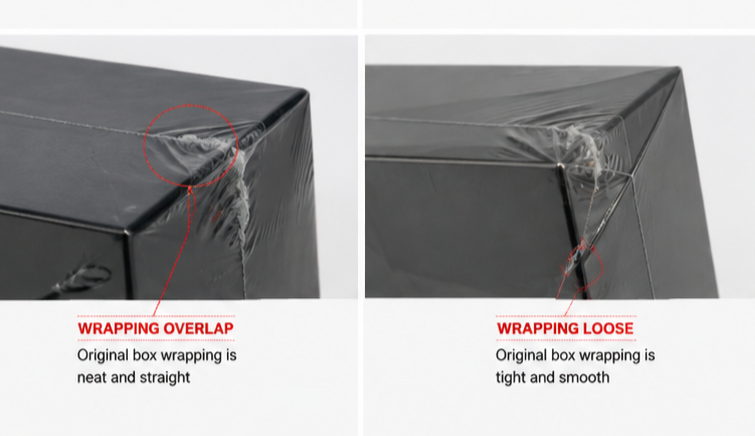
Check 1: Look closely at the box printing and stickers
Start with the model name, RAM, storage and colour on the label. Compare those details with the order and the handset. Look for blurred text, spelling errors, a label pasted over another label, torn seals or glue around an opening.
Treat each of these as a reason to ask a question. A scuffed corner could be shipping damage; a different sticker layout needs a comparison with the same regional version and batch. There is no single font, seal or box colour in this guide that guarantees authenticity.
- Ask for clear photographs of the front, back, seals and identification label.
- Compare with a known genuine box for the same version where possible.
- Have the seller explain any replaced label, broken seal or missing accessory before payment.
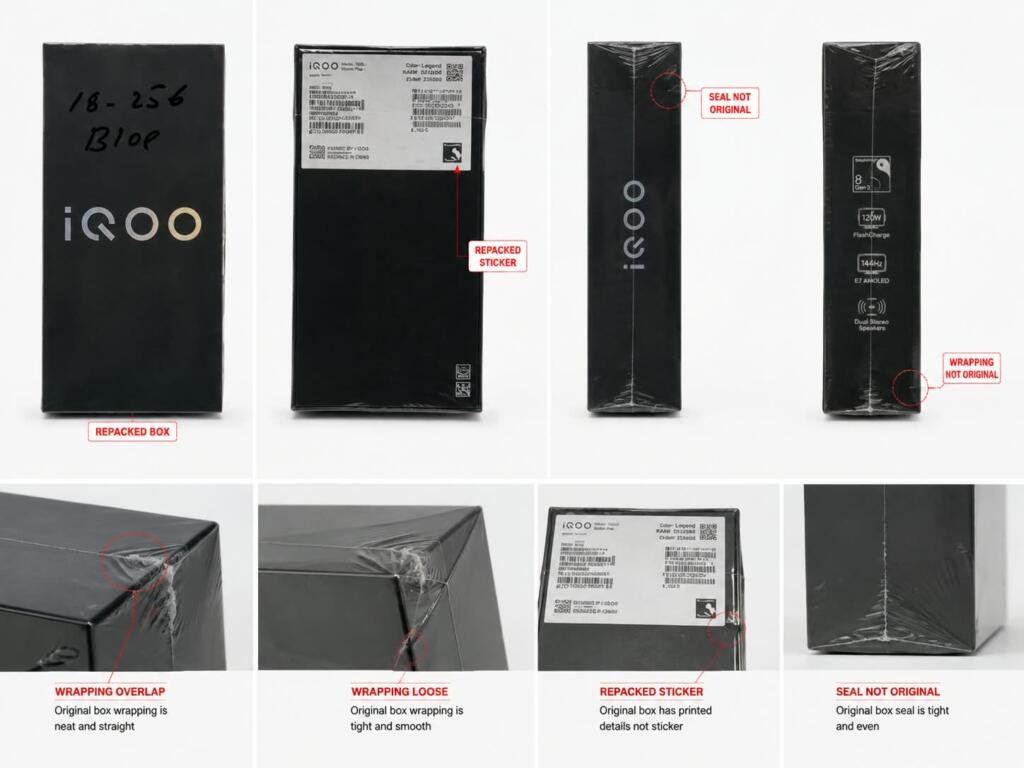
Check 2: Match the IMEI on the phone and box
On the handset, dial *#06# to display its IMEI details. You can also look in Settings under About phone or About device, then Status; menu names can vary. Realme lists these methods in its official support guidance.
Compare the numbers with the box label. Where two IMEIs are shown, check both. Also compare the model and variant, and ask the seller to record the device identifier on the invoice. Keep full IMEI photographs private when posting questions online.
A mismatch needs an explanation before you buy. A match is useful, but it is only one part of the check. Realme’s authenticity guidance says an IMEI lookup is a reference, with further verification available through a service centre. It does not certify every accessory inside the box.
Check 3: Inspect the charger and cable
Ask whether the quoted price includes the original adapter and cable. “Charger included” can mean several things, so get that detail written down.
Realme lists up to 80W charging for the Neo 8 in its official China specifications. Compare the supplied adapter’s model and output markings with the intended original accessory. Check the printing, casing, plug and cable connectors for damage or poor finishing. A printed wattage or logo alone is not enough to authenticate a charger.
With the seller’s agreement, test the supplied adapter and cable on the handset. A fast-charging indication is one useful observation. It does not prove the accessory is original, and a short test does not establish its maximum output. Ask for a known genuine comparison or service-centre inspection if the accessory remains doubtful.
Check 4: Confirm the activation status
Ask the seller a direct question: “Has this exact phone already been activated, and can you show me the record?” Request any available activation or electronic warranty information for that unit through the appropriate Realme service for its market.
Look at the wording of the result. An activation date, warranty start date and purchase date may describe different things. If the seller says “non-active,” ask what that claim is based on. An empty search result on a regional website is not enough to settle it.
you can also verify activation date from this link : https://support.oppo.com/cn/check/
A fresh setup screen or new wrapping cannot tell you the phone’s complete history. Equally, an earlier activation record does not tell you how heavily the handset was used. Ask why it was activated and make sure the condition is described accurately on the invoice. Confirm who will handle warranty support for the imported unit.
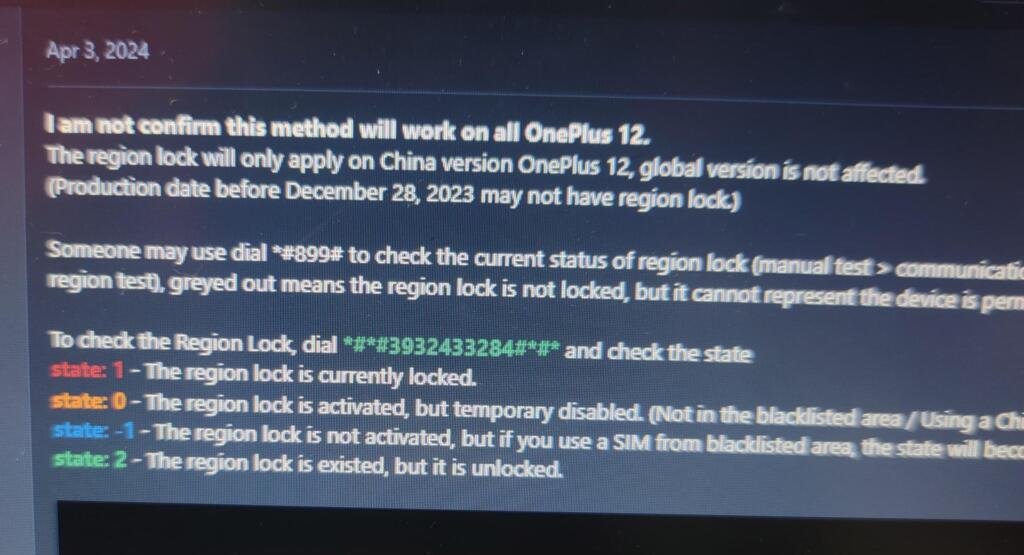
Check 5: Test the region-lock status
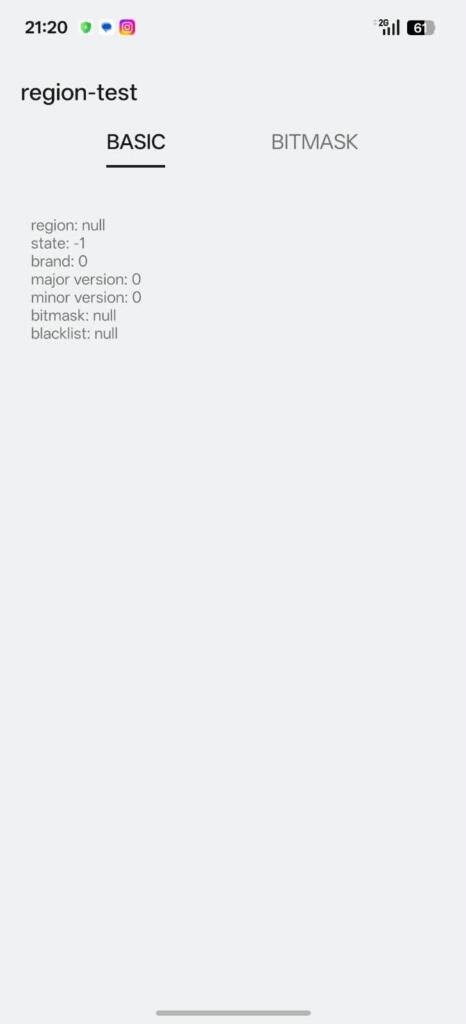
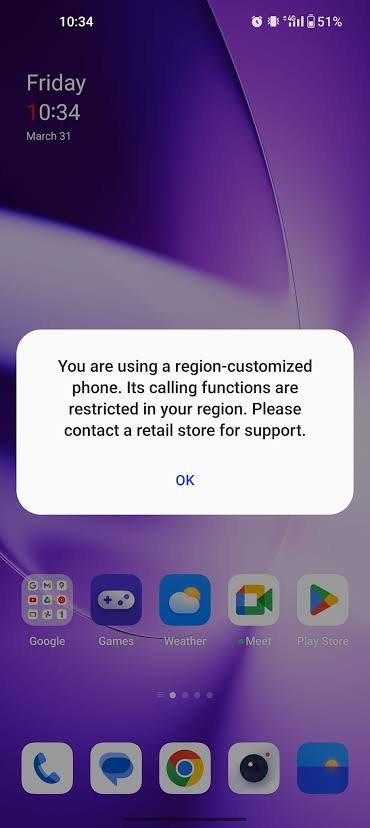
A box inspection cannot confirm whether a phone will make calls with your SIM. Ask for the region-lock status of the specific Realme Neo 8 being sold, including whether any unlocking or software work has already been done.
With permission to test, use your intended Pakistani SIM to try an outgoing call, an incoming call, an SMS and mobile data. Ask the seller to explain any regional warning shown on screen. A successful test tells you how that unit behaves at that moment; it is not a promise about every network or future software update.
Region restrictions, network compatibility and PTA status need separate checks. If service fails, investigate the cause before assuming the phone is fake. Before delivery, ask the team about these points on the Realme Neo 8 China-version listing and keep the response with your order details.
Checks 6 and 7: Verify the ROM and bootloader
Check 6: Find out which software is installed
Open About device and note the model, realme UI version and full software build number. Ask whether it is the original China firmware or whether it has been changed. If an offer says “Global ROM,” ask the seller to identify the official firmware and the exact model it was released for.
An English menu or an installed Play Store does not establish that a phone is an official global variant. Open the system update screen and ask how future updates will be handled. A working update screen alone does not prove the software has never been modified.
If Google Play is installed, its Settings → About section shows Play Protect certification. Google explains how to check it here. Certification is useful to review alongside the ROM details. For an essential banking app, check that app’s current requirements and test it yourself without sharing your PIN, password or OTP with the seller.
Check 7: Ask for the bootloader status
The bootloader helps control which system software the phone can start. Most Android devices ship with it locked, according to Android’s documentation. Ask the seller to demonstrate the current status using a method suitable for this model.
A warning about an unlocked bootloader during startup needs an explanation. The absence of a warning does not establish the phone’s full modification history. The “OEM unlocking” option in Developer options also does not, on its own, tell you whether the bootloader is currently unlocked.
There is no need to unlock or relock the phone just to inspect it. Those operations can erase data and should follow model-specific manufacturer guidance. If software changes are unclear, resolve them with the seller before buying.
Watch the Premium Phones awareness videos
Use these Premium Phones videos alongside the checklist when discussing a unit with the seller. Ask to see the same details on the phone you will receive; a demonstration video cannot verify a different handset.
Realme Neo 8 – Original vs Fake Box
Watch the original vs fake box video on Facebook if the player does not load.
Realme Neo 8 – Region Lock and Activation Check
Watch the region-lock and activation video on Facebook if the player does not load.
Ready to order your Realme Neo 8?
Before you choose, view available Realme Neo 8 variants and confirm the colour, final price, accessories and delivery arrangements. Availability can change, so use the live listing when comparing configurations.
Ask for the box condition, IMEI match, activation status, region-lock status, ROM and bootloader status in writing. Keep the invoice and the seller’s replies. If something is unclear, send the team your questions through our contact page before payment.
Once those details are clear, you can buy Realme Neo 8 from Premium Phones online or visit Shop # T2, 3rd Floor, Amma Tower, Saddar, Karachi. For availability and order assistance, call +92 342 2883962.

